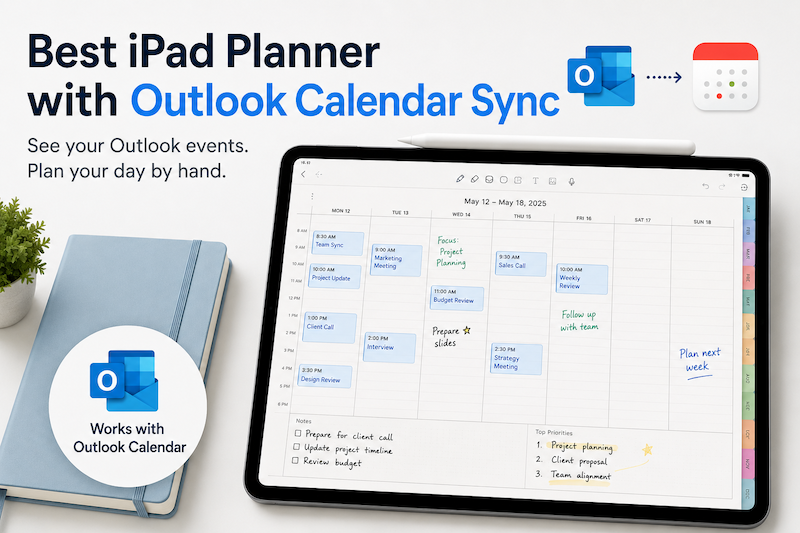
If you use Outlook Calendar for work, school, or personal scheduling, you probably already have most of your important events in one place.
Meetings, deadlines, classes, appointments, calls, reminders — Outlook is excellent for keeping track of structured events.
But when it comes to planning your day visually, Outlook can feel a little too rigid.
That is where an iPad planner can be useful.
With the right iPad planner app, you can see your Outlook calendar events and use Apple Pencil to write notes, plan your tasks, organize your day, and think more freely.
In this article, we will look at the best iPad planner with Outlook Calendar sync, and why Planner for iPad is a great choice for people who want both calendar integration and handwriting.
Why Outlook Users Need an iPad Planner
Outlook Calendar is powerful, especially for people who use Microsoft 365, work accounts, school accounts, or company calendars.
It is great for:
- Meetings
- Appointments
- Shared calendars
- Work schedules
- Class schedules
- Deadlines
- Online calls
- Team events
But Outlook is mainly designed as a calendar.
It tells you what is scheduled.
It does not always help you think through:
- What should I focus on today?
- What tasks should I do between meetings?
- What notes do I need for this appointment?
- What should I prepare before the next call?
- How do I want my day to actually flow?
That is why many people still like paper planners.
A paper planner gives you space to think, write, draw, plan, and adjust your day in a more natural way.
An iPad planner gives you that same handwriting experience, but with the convenience of a digital calendar.
Can an iPad Planner Sync with Outlook Calendar?
Yes.
However, the important point is that many iPad planner apps do not connect to Outlook directly.
Instead, they use the calendar system built into iPadOS.
This means that if your Outlook calendar is connected to the Apple Calendar app on your iPad, your Outlook events can appear inside compatible planner apps.
In other words:
Outlook Calendar → Apple Calendar on iPad → iPad planner app
So before choosing a planner app, you should check whether your Outlook events are already visible in the Apple Calendar app.
If they are, you can use them with apps that support calendar integration.
Best iPad Planner with Outlook Calendar Sync: Planner for iPad
Planner for iPad is a digital planner app designed for people who want to use their iPad like a real paper planner.
The biggest advantage is that it combines two things:
- Calendar events
- Apple Pencil handwriting
This makes it especially useful for Outlook users.
You can keep using Outlook as your main calendar, while using Planner for iPad as your visual daily planning space.
Instead of manually copying your Outlook schedule into a PDF planner, you can see your calendar events directly on your planner pages and write around them by hand.
Why Planner for iPad Works Well with Outlook
Planner for iPad is useful because it does not try to replace your existing calendar.
That is important.
If you already use Outlook for work or school, you probably do not want to move everything to a new calendar app.
You want your existing schedule to stay where it is.
Planner for iPad lets you use your current calendar setup while adding a more flexible planning layer on top.
You can use Outlook for appointments and meetings, then use Planner for iPad for:
- Daily planning
- Handwritten notes
- Task planning
- Meeting preparation
- Time blocking
- Weekly reviews
- Personal planning
- Visual organization
This is a much better workflow than using a static PDF planner.
Why a PDF Planner Is Not Enough for Outlook Users
PDF planners are popular because they look beautiful.
They often have nice templates, monthly pages, weekly pages, and daily pages.
But there is one big problem:
PDF planners do not automatically show your Outlook calendar events.
That means you have to copy your schedule by hand.
At first, that might feel fine.
But if your calendar changes often, it quickly becomes annoying.
For example:
- A meeting is moved to another time
- A class is canceled
- A client call is added
- A deadline changes
- A recurring event is updated
- A team meeting is rescheduled
With a PDF planner, you have to manually fix your planner every time.
With Planner for iPad, your calendar events can appear automatically from your iPad calendar system.
That makes it much easier to use as a real daily planning tool.
How to Use Outlook Calendar with Planner for iPad
To use Outlook Calendar with Planner for iPad, you first need to make sure your Outlook calendar is connected to your iPad.
Here is the basic setup flow:
- Open the Settings app on your iPad
- Add your Outlook or Microsoft account
- Enable calendar access
- Open the Apple Calendar app
- Check that your Outlook events appear there
- Open Planner for iPad
- Allow calendar access
- Start planning with your Outlook events on your planner pages
Once your Outlook events are available through the iPad calendar system, Planner for iPad can display them in your planner.
This gives you the best of both worlds:
Outlook for scheduling. Planner for iPad for thinking and planning.
Who Should Use Planner for iPad with Outlook Calendar?
Planner for iPad is a good choice for people who already use Outlook but want a more visual and flexible way to plan.
It is especially useful for:
Professionals
If you use Outlook at work, Planner for iPad can help you organize meetings, tasks, notes, and daily priorities in one place.
You can see your work schedule and write your plans around it.
Teachers and University Staff
Many schools and universities use Microsoft 365.
If your classes, meetings, and academic events are managed in Outlook, Planner for iPad can help you plan lessons, prepare notes, and manage your weekly schedule.
Students
If your school uses Outlook or Microsoft 365, you may already have your class schedule in Outlook Calendar.
Planner for iPad lets you combine that schedule with handwritten study plans, assignment notes, and exam preparation.
Freelancers and Consultants
Freelancers often have client meetings, project deadlines, and personal tasks spread across different systems.
Planner for iPad helps you turn your calendar into a more flexible planning space.
People Who Like Paper Planners
If you like the feeling of writing by hand, but do not want to give up digital calendar sync, Planner for iPad is a natural fit.
Outlook Calendar vs Handwritten Planning
Outlook Calendar and handwritten planning are good at different things.
Outlook is good for fixed events:
- Meetings
- Calls
- Appointments
- Deadlines
- Shared schedules
Handwritten planning is good for flexible thinking:
- Priorities
- Notes
- Ideas
- Reflections
- Task planning
- Daily organization
The best system is not choosing one over the other.
The best system is using both together.
Outlook keeps your schedule accurate.
Planner for iPad helps you understand and organize your day.
A Better Way to Plan Work Meetings
One of the best uses for Planner for iPad is meeting planning.
If your Outlook calendar is full of meetings, you can use Planner for iPad to prepare for them.
For example, before a meeting, you can write:
- Agenda items
- Questions to ask
- Decisions needed
- Materials to prepare
- Follow-up tasks
After the meeting, you can write:
- Important notes
- Action items
- Next steps
- People to contact
- Deadlines
This makes Planner for iPad more than just a calendar viewer.
It becomes a workspace for your day.
Why Apple Pencil Makes a Difference
Typing is fast, but handwriting feels different.
With Apple Pencil, you can write more naturally and organize your thoughts in a flexible way.
You can:
- Circle important events
- Add arrows
- Write quick notes
- Sketch ideas
- Mark priorities
- Create your own layout
- Plan visually
This is especially helpful if your day is not just a list of tasks.
For many people, planning is not only about efficiency.
It is also about thinking clearly.
Planner for iPad Is Not Just Another Calendar App
There are many calendar apps for iPad.
But Planner for iPad is different because it is designed around the experience of a paper planner.
It gives you a place where your calendar and handwriting can exist together.
That means you do not have to choose between:
- A digital calendar
- A handwritten planner
- A notebook
- A PDF planner
Planner for iPad brings those ideas closer together.
You can view your schedule and write freely on the same page.
Final Recommendation
If you are looking for the best iPad planner with Outlook Calendar sync, Planner for iPad is a strong choice.
It is especially useful if you want to keep using Outlook Calendar while adding a more natural, handwritten planning experience on iPad.
Outlook is great for managing your schedule.
Planner for iPad is great for planning your day around that schedule.
Together, they can create a more flexible and comfortable planning system.
If you want an iPad planner that works with your calendar and feels closer to paper, try Planner for iPad.