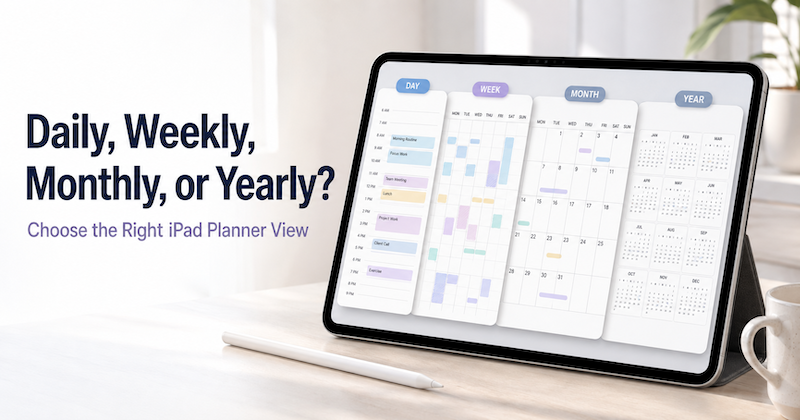
Open a planner and you are immediately asked to make a choice.
Should you look at today?
This week?
The whole month?
Or the entire year?
Each view can show the same life, but it does not help you think in the same way.
A daily planner is excellent for deciding what to do next. It is much less useful for noticing that three major deadlines are approaching in the same month.
A yearly planner can reveal the overall shape of your time. It cannot tell you whether you have room to finish a report between Tuesday’s meetings.
The solution is not to choose one perfect planner view and use it for everything. It is to use each view for the kind of decision it handles best.
Yearly planning gives you direction.
Monthly planning gives you perspective.
Weekly planning gives you structure.
Daily planning gives you action.
Here is how the four views work together—and how to decide which one you need right now.
Why One Planner View Is Not Enough
Most planning problems are really problems of scale.
Sometimes you are looking too closely.
You are busy answering emails, attending meetings, and completing small tasks, but you cannot tell whether any of that is moving an important project forward.
Sometimes you are looking from too far away.
You have a goal for the year, but it remains a sentence at the top of a page because you have not decided what to do this week.
Different planner views let you change the scale of the question.
| Planner view | Main question | Best for |
|---|---|---|
| Yearly | Where is my year going? | Seasons, major goals, travel, long projects, important dates |
| Monthly | What is the shape of this month? | Deadlines, busy periods, milestones, capacity |
| Weekly | What can I realistically accomplish? | Priorities, time allocation, balancing commitments |
| Daily | What should I do next? | Tasks, appointments, notes, and immediate decisions |
Think of these views as different zoom levels on the same map.
When the details feel overwhelming, zoom out.
When a goal feels vague, zoom in.
Yearly View: Decide Where You Are Going
The yearly view is the widest planning perspective.
It is not designed for detailed task lists. Its purpose is to help you see how the largest parts of your life relate to one another across twelve months.
You might use it to mark:
- Major project periods
- Product launches
- Vacations and travel
- School terms and exams
- Conferences
- Financial deadlines
- Family events
- Busy seasons at work
- Long-term personal goals
- Months you deliberately want to keep light
Looking at an entire year can reveal patterns that remain invisible in a daily calendar.
Perhaps two projects are scheduled to finish within the same three-week period. A vacation sits immediately after the busiest month at work. A personal goal has been postponed into the final quarter, where there is already no room for it.
The year view does not solve those problems for you. It makes them visible early enough for you to respond.
What belongs in the yearly view?
Add things that influence weeks or months—not everything that happens on an individual day.
A dentist appointment probably does not need to appear in your handwritten yearly plan. A two-week trip does.
A routine team meeting does not need to be emphasized. A major launch date that shapes the six weeks before it does.
The yearly view is also a good place for uncertain plans.
With Apple Pencil, you can circle a possible travel period, draw an arrow between project phases, write “keep this month light,” or place a question mark beside an idea that has not become a commitment yet.
For a deeper guide, read Best Yearly Planner App for iPad with Apple Pencil: See Your Entire Year at a Glance.
Monthly View: Understand the Shape of Your Time
The monthly view brings you closer to action without getting lost in daily detail.
Its most useful job is showing concentration.
Where are the deadlines?
Which week is unusually busy?
Is there enough preparation time before a trip?
Are personal commitments disappearing behind work?
Suppose your calendar shows a business trip in the second week, a project deadline on the 20th, and a family event at the end of the month.
Viewed as three separate events, each one may look manageable.
Viewed together on a monthly page, they tell a different story. The project may need to be finished before the trip. The week after the trip may need to remain relatively open. Preparations for the family event cannot wait until the final weekend.
What belongs in the monthly view?
Use the monthly page for:
- Important deadlines
- Travel and appointments that affect nearby days
- Project milestones
- One or two priorities for the month
- Busy and quiet periods
- Habits or routines you want to notice over time
- Events that require preparation in advance
The monthly view should explain the landscape. It does not need to contain every step required to cross it.
Once you understand the month, move to the weekly view to decide what is realistically possible.
For more detail, see Best Monthly Planner App for iPad with Apple Pencil: See Your Calendar and Big-Picture Plans in One View.
Weekly View: Turn Priorities into a Realistic Plan
The weekly view is where strategy meets capacity.
A monthly goal may sound reasonable until you place the actual work beside your meetings, appointments, family responsibilities, and other commitments.
The week makes tradeoffs visible.
You may want to finish three important tasks, but Wednesday is filled with meetings and Friday afternoon is unavailable. Once you see that, you can stop pretending every day has the same amount of usable time.
What belongs in the weekly view?
Use it to decide:
- The two or three outcomes that matter most this week
- Which days have space for focused work
- What needs to happen before a deadline
- Which tasks can fit around fixed appointments
- What should be delayed, delegated, or removed
- Where you need rest or unscheduled time
A weekly planner is especially useful when your events live across several calendars.
Your work meetings may be in Outlook. Personal appointments may be in Apple Calendar. Family events may arrive through a shared Google Calendar.
Before planning the week, you need to see those commitments together. The guide Best iPad Planner for Multiple Calendars: How to Combine Work, Personal, and Family Schedules explains how to create that combined perspective.
For a complete weekly workflow, read Best Weekly Planner App for iPad with Apple Pencil: See Your Calendar and Handwritten Plans in One View.
Daily View: Decide What to Do Next
The daily view is the closest planning perspective.
It helps you turn a weekly intention into a specific day.
The question is no longer “What matters this month?” It is:
What can I actually do today, around the schedule I already have?
Start with fixed events. Then look at the space between them.
You might write:
- The day’s most important task
- A short preparation note beside a meeting
- Two small tasks for an open 30-minute period
- An errand near an appointment
- A reminder to follow up after a call
- A note about something that happened during the day
The daily view should reduce uncertainty. When you open it, you should be able to see what deserves your attention next.
It does not need to contain every task you might possibly complete.
A long task list can make a day look available when the calendar says otherwise. A better daily plan begins with the appointments that are already fixed and adds a small number of realistic actions around them.
If your tasks are stored in Apple Reminders, see Best iPad Planner with Apple Reminders Sync: Turn To-Dos into a Handwritten Daily Plan.
For a detailed daily planning method, read Best Daily Planner App for iPad with Apple Pencil: Plan Your Day Around Your Calendar.
How the Four Planner Views Work Together
The four views become most useful when information moves from broad intention to specific action.
The basic sequence is:
Year → Month → Week → Day
The yearly view gives the month a direction.
The monthly view gives the week a priority.
The weekly view gives the day a realistic next step.
This does not mean you need to rewrite everything four times.
Only move information to a smaller view when it becomes useful at that scale.
A yearly page might contain “Launch new website — October.”
The October monthly page might divide that into three milestones:
- Finalize design
- Build and test
- Publish
The first weekly page might contain:
- Approve homepage design
- Prepare final copy
- Collect product screenshots
Tuesday’s daily page might then contain one concrete action:
- Review homepage draft from 10:00–11:00
At each level, the plan becomes more specific—but only when specificity is useful.
A Practical Planning Routine
You do not need to review every view every day.
A simple rhythm is enough.
At the beginning of the year—or whenever plans change
Open the yearly view.
Mark major commitments, long projects, travel, school periods, and important personal plans. Look for crowded seasons and protect some empty space.
You can begin in September, April, or the middle of an ordinary week. Annual planning does not have to start on January 1.
At the beginning of each month
Look at the year first, then open the monthly page.
Ask:
- What is this month supposed to accomplish?
- Which dates will shape the rest of the month?
- Where is the month overloaded?
- Which week has the best space for important work?
- What should I avoid adding?
Choose one or two priorities rather than trying to transform every part of your life at once.
At the beginning or end of each week
Review the monthly page, then open the week.
Check fixed calendar events before adding tasks. Decide what can genuinely fit. Choose the week’s most important outcomes and assign them to days with enough capacity.
Leave some open space. A week planned to 100 percent capacity is already behind as soon as anything unexpected happens.
At the beginning or end of each day
Open the daily page.
Look at today’s appointments and choose a small number of actions. Add brief notes around the schedule. At the end of the day, move only the work that still matters—not every unfinished task automatically.
This routine can take a few minutes. The purpose is not to maintain an elaborate system. It is to keep the different timescales connected.
Example: Planning a Product Launch Across Four Views
Imagine that you want to launch a new product in November.
Yearly view
You block out September through November as the project period and notice that October already includes a week of travel.
That changes the broad plan:
- September: research and design
- October: production and testing
- November: launch
Monthly view
At the beginning of September, you identify four milestones:
- Confirm the product scope
- Finish the first design
- Prepare the landing page
- Begin development
You also see two busy weeks filled with existing commitments, so you place the most demanding work in the quieter parts of the month.
Weekly view
This week, you choose three outcomes:
- Finalize the feature list
- Review the first design
- Draft the landing page structure
Then you compare those goals with your calendar. Monday and Wednesday are meeting-heavy, so you protect Tuesday morning and Thursday afternoon for focused work.
Daily view
On Tuesday, you write:
- 9:00–10:30: Finalize feature list
- Send design feedback before lunch
- Write the landing page headline after the 3:00 meeting
The yearly goal has now become something you can do today.
For more help turning large plans into weekly steps, read Best iPad Planner for Project Planning: How to Turn Big Goals into Weekly Action Plans.
How to Know When You Are Using the Wrong View
Your planning can become difficult simply because you are looking at it from the wrong distance.
Zoom out when:
- Your day is full, but important goals are not moving
- Several deadlines seem to appear suddenly
- You keep agreeing to commitments without understanding your capacity
- Work and personal priorities are competing invisibly
- You cannot tell whether a problem belongs to today or to the whole month
Move from the daily view to the weekly or monthly view. If the problem involves several months, open the year.
Zoom in when:
- A goal sounds important but never produces action
- A project has been sitting on the monthly page for weeks
- You keep writing the same priority without deciding when to work on it
- The year looks ambitious, but today feels directionless
Move from the year to the month, from the month to the week, and from the week to one specific day.
The right view is the one that helps you make the next useful decision.
Avoid Turning Every View into the Same Task List
One common mistake is copying the same information into every planner view.
The result is four crowded pages that all say roughly the same thing.
Instead, allow each view to have a different level of detail.
Yearly
Use themes, seasons, major commitments, and approximate project periods.
Monthly
Use milestones, deadlines, priorities, and capacity.
Weekly
Use outcomes, time allocation, and tradeoffs.
Daily
Use actions, appointments, and immediate notes.
This reduces repetition and makes each page easier to understand.
Your yearly planner does not need Tuesday’s task.
Your daily planner does not need the entire twelve-month strategy.
Why Handwriting Helps at Every Scale
Calendar apps are excellent at storing confirmed events.
Tasks apps are excellent at remembering things you need to do.
But planning often includes thoughts that are not ready to become formal data.
Maybe this week.
Prepare before the trip.
Do not schedule anything here.
This project is becoming too large.
Ask again next month.
With Apple Pencil, you can place those thoughts directly beside the schedule that prompted them.
You can circle a crowded week, draw an arrow from a deadline to its preparation period, cross out an unrealistic plan, or write a question in the margin.
Handwriting gives unfinished thinking somewhere to exist.
That matters at every scale, from choosing the direction of a year to rearranging an ordinary afternoon.
Using Planner for iPad Across Daily, Weekly, Monthly, and Yearly Views
Planner for iPad is designed for people who want the flexibility of a paper planner without separating their plans from their digital calendar.
You can use Apple Pencil to write directly on daily, weekly, monthly, and yearly planner pages. Calendar events connected to your iPad can appear on the relevant planner views, giving you the fixed structure of your schedule before you add your handwritten planning layer.
This creates a useful division of labor:
- Your calendar stores confirmed events
- Apple Reminders can store tasks you do not want to forget
- Your planner helps you decide how the year, month, week, and day should work
You do not need to force every thought into a calendar event or turn every note into a task.
Zoom out when you need context.
Zoom in when you need action.
Final Thoughts
There is no single best planner view.
A yearly planner is too broad for deciding what to do after lunch.
A daily planner is too narrow for understanding whether the next three months are overloaded.
Each view solves a different problem:
- Yearly planning gives you direction
- Monthly planning gives you perspective
- Weekly planning gives you structure
- Daily planning gives you action
The real value comes from moving between them.
When today feels chaotic, look at the week.
When the week feels crowded, look at the month.
When the month feels disconnected, look at the year.
And when the year feels vague, return to today and choose one concrete next step.
Download Planner for iPad on the App Store and try planning at more than one scale. Start with the year for direction, move to the month for perspective, use the week for structure, and open the day when it is time to act.