A daily planner helps you manage today.
A weekly planner helps you organize the next few days.
But sometimes you need to zoom out.
A monthly planner gives you a different perspective. Instead of asking, “What do I need to do next?” you can ask:
What does this month actually look like?
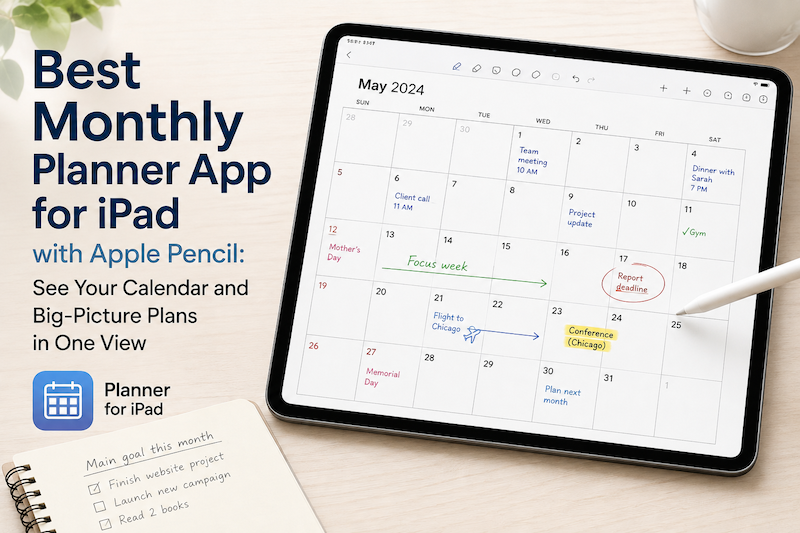
On an iPad, a monthly planner can be especially useful when it combines two things that are usually separated: your real calendar schedule and the freedom to write by hand with Apple Pencil.
With Planner for iPad, calendar events can appear directly on daily, weekly, and monthly planner pages, so you can see your existing schedule and add handwritten plans around it.
Here is why the monthly view can become one of the most useful parts of your digital planning system.
Why Use a Monthly Planner When You Already Have a Calendar?
Calendar apps are already very good at showing a month.
Open Apple Calendar or Google Calendar and you can immediately see appointments, meetings, birthdays, trips, and other scheduled events.
So why use a monthly planner?
Because a calendar shows what is scheduled.
A planner helps you think about what the month means.
Imagine looking at August and seeing:
- A business trip in the second week
- A project deadline on the 21st
- A family event near the end of the month
- Several unusually busy Mondays
- A relatively open week in the middle
Your calendar contains all of those events.
But when you look at them as a planner, you may start thinking differently.
You might write:
Finish proposal before trip
Circle the open week and write:
Good week for focused work
Draw an arrow toward the final weekend:
Prepare birthday gift
Or simply write at the top of the page:
Main goal: Launch new website
That is the difference between viewing a calendar and planning a month.
Monthly Planning Is About Seeing the Big Picture
Daily planning naturally pulls your attention toward what is urgent.
Emails.
Meetings.
Appointments.
Things that need to happen today.
That is useful—but it can also make longer-term priorities disappear.
A monthly view gives those priorities somewhere to live.
You can see several weeks at once and notice patterns that are difficult to see when moving from one day to another.
For example:
- Which weeks are overloaded?
- Where are your deadlines concentrated?
- When do you actually have time for a larger project?
- Are you leaving enough space before a trip?
- Is one part of the month much busier than another?
- Are personal commitments disappearing behind work commitments?
The monthly planner becomes less of a detailed schedule and more of a map of the month.
See Your Real Calendar Events Before You Start Planning
One problem with traditional paper planners—and many PDF planners on iPad—is that the planner does not know what is already on your calendar.
You may already have dozens of events in Apple Calendar or Google Calendar.
If your planner is completely separate, you have to copy those events manually before you can properly plan around them.
That creates unnecessary work.
Planner for iPad is designed differently. Instead of treating your planner and calendar as completely separate systems, it lets you see calendar events while planning by hand.
That means you can start with reality.
See what is already happening.
Then add your own layer of planning with Apple Pencil.
Why Apple Pencil Works So Well for Monthly Planning
A month is difficult to reduce to a list.
There are relationships between things.
A deadline affects the week before it.
A vacation means you may need to finish work earlier.
A busy weekend may make the following Monday less realistic.
Handwriting makes those relationships easy to express.
With Apple Pencil, you can:
- Circle an important date
- Draw an arrow between related events
- Write a monthly priority in an empty space
- Mark particularly busy days
- Cross out a plan that changed
- Add a short note beside a deadline
- Use symbols to identify work, family, study, or personal events
- Write reminders without creating another formal task
This kind of planning does not always fit neatly into structured productivity software.
Sometimes you just want to look at the month and think on the page.
That is where handwriting becomes useful.
A Simple Way to Plan Your Month on iPad
You do not need an elaborate monthly planning ritual.
A few minutes at the beginning of each month can be enough.
1. Start With Your Calendar
Look at the events that are already fixed.
Meetings.
Trips.
Appointments.
School events.
Deadlines.
Birthdays.
These are the structure of the month.
Do not start by imagining the perfect month. Start with the month you actually have.
2. Identify the Important Dates
Not every calendar event deserves the same amount of attention.
Use Apple Pencil to circle or mark the dates that will affect the rest of your planning.
A presentation on the 25th, for example, is not just something happening on the 25th.
It may affect what you need to do on the 18th, 19th, and 20th.
Seeing the whole month makes that easier to notice.
3. Choose One or Two Monthly Priorities
Try not to fill the monthly page with dozens of goals.
Instead, ask:
If this month goes well, what will I have accomplished?
Perhaps:
- Finish the first version of a new product
- Prepare for an exam
- Organize a family trip
- Exercise consistently
- Finish reading two books
Write those priorities somewhere visible.
They become a reference point when deciding what deserves space in your weekly and daily plans.
4. Look for Busy and Quiet Periods
This is one of the biggest advantages of monthly planning.
You may discover that the first two weeks are extremely busy but the third week is relatively open.
That open week is valuable.
Instead of accidentally filling it with small tasks, you can protect it for something important.
Likewise, if the final week is already crowded, you can avoid placing another major deadline there.
5. Move From Month to Week
The monthly page is not where you need to plan every detail.
Its job is to help you understand the landscape.
Once you know what matters, move into the weekly view and decide how to make it happen.
That creates a natural planning hierarchy:
Monthly: What matters this month?
Weekly: What should I accomplish this week?
Daily: What should I do today?
With Planner for iPad, you can use daily, weekly, and monthly views as part of the same Apple Pencil-based planning system.
Monthly Planning for Work
A monthly view is especially useful when your work contains projects that last longer than a few days.
You might use it to track:
- Product launches
- Client deadlines
- Conferences
- Business trips
- Reporting dates
- Content schedules
- Major meetings
- Project milestones
Instead of treating each event independently, you can see how they interact.
Three deadlines in the same week suddenly become obvious.
So does the quiet week you could use to begin your next project.
Monthly Planning for Students
Students often live with two different timescales.
There is the immediate question:
What homework do I need to finish tonight?
And the larger question:
What is coming later this month?
A monthly planner can make exams, assignments, presentations, school events, and holidays visible together.
You can then write preparation reminders before the actual due dates rather than discovering everything when it becomes urgent.
Monthly Planning for Family Life
Family schedules are another area where a monthly perspective helps.
A single month might contain:
- School events
- Medical appointments
- Birthdays
- Sports practices
- Work travel
- Family visits
- Holidays
- Personal plans
Individually, none of these may seem complicated.
Together, they determine how much free time you really have.
Seeing them on one page makes it easier to avoid overcommitting yourself.
Monthly Planning Should Not Become Another Job
It is easy to turn digital planning into a hobby of maintaining the planner itself.
Perfect templates.
Color systems.
Complex trackers.
Dozens of categories.
There is nothing wrong with that if you enjoy it.
But you do not need any of it to get value from a monthly planner.
A useful monthly page can be very simple:
Your existing calendar events.
A few handwritten notes.
Several important dates.
One or two priorities.
That may be enough.
The point is not to create the perfect month.
The point is to understand the month before it happens.
Daily, Weekly, and Monthly Planning Work Better Together
No single planner view answers every question.
The monthly view is good for perspective.
The weekly view is good for balancing your workload.
The daily view is good for deciding what to do next.
Think of them as three different zoom levels.
Monthly = See the big picture
Weekly = Organize the plan
Daily = Take action
When all three are part of the same planning system, you can move between them depending on the decision you need to make.
That is much more useful than trying to squeeze your entire life into one giant task list.
Try Planner for iPad
If you like the idea of a paper monthly planner but also depend on a digital calendar, you should not have to choose between them.
Planner for iPad combines calendar-based planning with the flexibility of Apple Pencil handwriting.
Your calendar can provide the fixed events.
Your monthly planner can provide the bigger picture.
And your handwriting can fill in everything that does not belong in a calendar event.
At the beginning of your next month, open the monthly view before you start making detailed plans.
Look at what is already there.
Circle what matters.
Find the crowded weeks.
Find the open ones.
Then decide what you want the month to become.
Sometimes planning gets easier simply by zooming out.