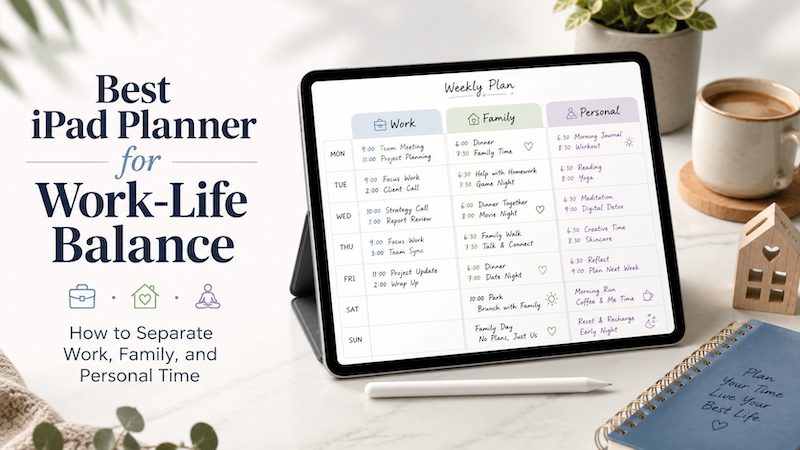
Work-life balance is not just about doing less.
For many people, the real problem is that work, family, and personal plans are scattered across too many places. Work meetings live in one calendar. Family events are sent through messages or school emails. Personal goals are written in a notebook, saved in a notes app, or simply kept in your head.
The result is a day that looks organized in theory, but feels chaotic in real life.
An iPad planner can help because it gives you one place to see your actual schedule and think about how you want to use your time. Instead of switching between a calendar app, a paper notebook, a to-do list, and your memory, you can bring everything together on one screen.
With the right setup, an iPad planner can become more than a digital notebook. It can become a practical space for managing work, family, and personal time without losing sight of yourself.
Why Work-Life Balance Is So Hard to Plan
Most people do not struggle with work-life balance because they are bad at planning.
They struggle because their time is divided across different roles.
You may be an employee or business owner during the day.
A parent, partner, or caregiver in the morning and evening.
A friend, family member, and individual person somewhere in between.
Each role creates its own schedule, responsibilities, and mental load.
A work calendar may show meetings and deadlines, but it does not show that you need quiet time after a long call. A family calendar may show school events, appointments, and activities, but it does not show how tired you will feel after moving between them. A personal to-do list may include exercise, reading, or hobbies, but those often disappear when the day becomes full.
This is why a normal calendar is useful, but not always enough.
A calendar tells you what is scheduled.
A planner helps you decide how to live around that schedule.
The Problem with Keeping Work, Family, and Personal Time Separate
Separating work and personal life sounds healthy. In practice, though, it can become difficult when everything is stored in different places.
You may have:
- A work calendar for meetings
- A personal calendar for appointments
- A family calendar for shared events
- A task app for reminders
- A notebook for planning
- Messages and emails containing important details
Each tool may work well on its own. The problem is that your life does not happen in separate apps.
A 4:00 PM meeting affects your ability to pick up your child.
A family appointment affects your work focus.
A personal commitment affects how much energy you have the next day.
When your schedule is split into pieces, it becomes harder to understand the whole day.
This is where an iPad planner can be especially helpful. It gives you a visual planning space where your schedule and your thoughts can sit together.
Why an iPad Planner Works Well for Work-Life Balance
A paper planner is great for reflection, handwriting, and flexible planning. But it usually cannot show your live calendar events automatically.
A calendar app is great for time-based events. But it often feels too rigid for personal planning, journaling, or thinking through your day.
An iPad planner sits between the two.
It gives you the freedom of handwriting, but with the convenience of digital planning. You can write with Apple Pencil, review your schedule, add notes, and adjust your plan without rewriting an entire page.
For work-life balance, that combination matters.
You need structure, because your calendar is real.
But you also need flexibility, because your life is not just a list of events.
Step 1: Bring Your Calendars Together
The first step is to make sure your important calendars are visible in one place.
For many people, this means using Apple Calendar as the central calendar on iPad. If your work, family, Google Calendar, Outlook Calendar, or other calendars are connected to Apple Calendar, you can view them more easily from your iPad.
This matters because work-life balance becomes easier when you can see your real commitments together.
Instead of checking one app for work, another for family, and another for personal plans, you can start with a complete view of the day.
For example, your calendar might include:
- Work meetings
- School events
- Family appointments
- Exercise time
- Travel time
- Personal reminders
- Social plans
- Important deadlines
Once these events are visible, you can begin planning around reality instead of guessing how much time you have.
Step 2: Separate Calendars by Life Area
Bringing calendars together does not mean everything should become one messy list.
A better approach is to separate your calendars by life area.
You might use different calendars for:
- Work
- Family
- Personal
- Health
- School
- Projects
- Shared household plans
This makes it easier to understand what kind of time is filling your week.
For example, if your work calendar dominates every weekday evening, you can see the imbalance clearly. If family logistics are filling every weekend, you can notice that too. If personal time never appears at all, that is also important information.
Work-life balance begins with visibility.
You cannot adjust what you cannot see.
Step 3: Plan Around Real Events, Not an Ideal Day
One of the biggest mistakes in planning is creating an ideal day that ignores your actual calendar.
You might write:
- Exercise in the morning
- Deep work from 9 to 12
- Family time in the evening
- Reading before bed
That sounds nice. But if your calendar already has early meetings, school drop-off, errands, and late calls, the plan falls apart quickly.
A better approach is to start with your real events first.
Look at what is already fixed. Then plan around it.
Ask yourself:
- Where do I have open space?
- Which part of the day will require the most energy?
- Where do I need buffer time?
- What should not be scheduled today?
- What can wait until tomorrow?
This is one reason an iPad planner can be more useful than a simple to-do list. You are not planning in an empty space. You are planning next to the shape of your actual day.
Step 4: Use Handwriting to Add Context
Calendar events are usually short.
They might say:
- Team meeting
- Dentist
- School event
- Dinner
- Deadline
But your real life contains more context than that.
A meeting may require preparation.
A family event may require travel time.
A deadline may create stress for the rest of the day.
A personal appointment may be important even if it looks small.
Handwriting gives you a place to add that context.
Next to your calendar events, you can write things like:
- Prepare agenda before meeting
- Leave 20 minutes early
- Do not schedule anything after this
- Bring documents
- Keep evening free
- Move this task to tomorrow
- Ask for help if needed
These small notes are often what make planning actually work.
A calendar tells you what is happening.
Handwritten notes help you understand what each event means.
Step 5: Protect Personal Time Like a Real Commitment
Many people put work meetings and family events on their calendar, but leave personal time invisible.
That creates a problem.
If your personal time is not written down, it becomes easy to give it away.
Exercise, rest, reading, hobbies, reflection, and quiet time may not feel urgent. But they are often what keep the rest of your life sustainable.
Try adding personal time to your calendar or planner as if it were a real appointment.
This does not have to be dramatic. It can be simple:
- 20 minutes for a walk
- 30 minutes for reading
- No meetings after 6 PM
- Planning time on Sunday evening
- Morning coffee without email
- A quiet evening after a busy day
The goal is not to schedule every minute of your life. The goal is to make personal time visible enough that it has a chance to survive.
Step 6: Use Weekly Planning to See the Bigger Picture
Daily planning is useful, but work-life balance often becomes clearer at the weekly level.
A single busy day may be fine.
Five overloaded days in a row is different.
At the beginning of the week, review your calendar and look for patterns.
Ask:
- Which days are already full?
- Where do I need more buffer time?
- Are there too many evening commitments?
- Is there any time for myself?
- Which day is best for focused work?
- Which day should stay lighter?
A weekly review helps you avoid treating every day as a separate emergency.
It also helps you make better decisions before the week becomes overwhelming.
For example, if Tuesday and Wednesday are already packed, you may decide not to add extra errands. If Friday is lighter, you may move flexible tasks there. If the weekend is full of family plans, you may protect one quiet evening during the week.
Work-life balance is easier when you plan the week as a whole.
Step 7: Keep Work from Expanding Into Every Empty Space
One of the hardest parts of work-life balance is that work tends to expand.
If there is an empty hour, it becomes a work hour.
If there is a quiet evening, it becomes email time.
If there is no boundary, work fills the space.
An iPad planner can help you create visual boundaries.
You can mark when the workday ends. You can write personal plans directly into the same daily page. You can leave blank space intentionally, instead of treating it as unused time.
This is important.
Blank space is not wasted time.
Sometimes blank space is recovery time.
Sometimes it is thinking time.
Sometimes it is the difference between a sustainable week and an exhausting one.
A good planner should not only help you do more. It should also help you notice when you are trying to do too much.
Step 8: Use Different Planning Styles for Different Areas of Life
Work, family, and personal planning do not always need the same format.
Work planning may need:
- Time blocks
- Meeting notes
- Deadlines
- Task lists
- Project priorities
Family planning may need:
- Shared events
- School schedules
- Appointments
- Errands
- Travel time
Personal planning may need:
- Habits
- Reflection
- Reading lists
- Health goals
- Free space
An iPad planner lets you combine these planning styles without needing multiple notebooks.
You can use calendar events for fixed commitments, handwriting for flexible thoughts, and notes for longer planning. This makes it easier to keep different parts of your life connected without forcing everything into the same format.
Why Planner for iPad Is a Good Fit for Work-Life Balance
Planner for iPad is designed for people who want the feeling of a handwritten planner, but with the convenience of calendar integration.
Instead of using a static PDF planner where you have to copy events manually, Planner for iPad can show calendar events directly on your planner pages through Apple Calendar. This makes it easier to plan around real appointments, meetings, and family events.
You can use Apple Pencil to write notes around your schedule, add context, adjust your plans, and reflect on your day.
This is especially useful for work-life balance because your day is not only made of events. It is also made of decisions:
- What should I focus on today?
- Where do I need more space?
- What can I postpone?
- What matters outside of work?
- What do I need to remember for my family?
- What do I need for myself?
Planner for iPad gives you a place to answer those questions while still seeing the structure of your calendar.
A Simple Work-Life Balance Planning Routine
Here is a simple routine you can try.
Morning: Check the Shape of the Day
Look at your calendar events and write a short plan for the day.
Focus on:
- Your top priority
- Any time-sensitive tasks
- Family or personal commitments
- Buffer time
- One thing you want to protect
This can take just a few minutes.
Midday: Adjust the Plan
Your morning plan may not survive unchanged.
That is normal.
At midday, quickly review what has changed. Move tasks, add notes, and adjust expectations. The goal is not to follow the original plan perfectly. The goal is to stay aware of your time.
Evening: Close the Day
At the end of the day, write a short note.
You might record:
- What went well
- What felt too crowded
- What should move to tomorrow
- What you want to protect next time
This helps you learn from your schedule instead of repeating the same overload every week.
Common Mistakes to Avoid
Trying to Plan Every Minute
Work-life balance does not require a perfect schedule.
In fact, planning every minute can make your day feel more fragile. Leave space for delays, transitions, and unexpected tasks.
Treating Personal Time as Optional
If personal time only happens after everything else is finished, it may never happen.
Put it somewhere visible.
Mixing Every Task Into One List
A single long task list can make everything feel equally urgent.
Try separating tasks by area: work, family, personal, errands, and later.
Ignoring Energy Levels
A calendar shows time, but not energy.
Use your planner to notice when you are likely to feel focused, tired, distracted, or available. Plan difficult tasks when you have the best chance of doing them well.
Final Thoughts
Work-life balance is not about creating a perfect separation between work and personal life.
For most people, life is more complicated than that.
Work affects family time.
Family responsibilities affect work.
Personal energy affects everything.
The goal is not to pretend these areas are completely separate. The goal is to see them clearly enough to make better choices.
An iPad planner can help because it brings structure and flexibility together. Your calendar gives you the facts of the day. Your handwriting gives you the space to think, adjust, and decide what matters.
When work, family, and personal time are all visible, balance becomes less abstract.
You can see where your time is going.
You can notice what is missing.
You can protect what matters before the week fills up.
That is what a good planner should do.
Not just help you stay busy, but help you build a life that feels more intentional.