Family life rarely fits neatly into a simple to-do list.
There are school events, doctor appointments, work meetings, meal plans, sports practices, birthdays, permission slips, errands, and those tiny “don’t forget” notes that somehow decide whether the week goes smoothly or completely falls apart.
For parents, planning is not just about being productive. It is about keeping a household moving.
That is why the best iPad planner for parents needs to do more than show a calendar. It needs to help you see your family’s schedule, think through the week, and write down the messy details that do not belong in a standard calendar app.
Why Parents Need a Different Kind of Planner
Most planning apps are built around one person’s productivity.
They are great for tasks like:
- Finish a project
- Join a meeting
- Buy groceries
- Reply to an email
But family planning is different. A parent’s schedule is often connected to several other people’s lives.
You may need to remember that your child has a school event on Thursday, your partner has a late meeting, the car needs to be picked up, dinner needs to be simple that night, and someone still needs to buy a birthday gift before the weekend.
A normal calendar can show the event. But it does not always help you think around the event.
That is where an iPad planner can be useful.
The Problem with Regular Calendar Apps
Calendar apps are excellent for fixed events. They tell you what is happening and when.
But for parents, the problem is usually not only the event itself. It is everything around it.
For example, a calendar event might say:
School concert — 5:00 PM
But the real planning looks more like this:
- Leave home by 4:20
- Pack camera
- Bring indoor shoes
- Prepare early dinner
- Ask grandparents if they want photos
- Check whether younger sibling needs to come too
These details are too small and too flexible for a calendar event, but too important to keep in your head.
This is why many parents still rely on paper planners, sticky notes, notebooks, or a whiteboard on the fridge.
Why PDF Planners Can Be Frustrating
Many digital planners for iPad are based on PDF templates. They look beautiful, and they can feel close to using a paper planner.
But they also have a common problem: your actual calendar events usually do not appear automatically inside the planner.
That means you may end up copying events from Apple Calendar, Google Calendar, or Outlook into your planner by hand.
For parents, that can become a lot of extra work.
Family schedules change constantly. A class gets canceled. A meeting moves. A doctor appointment is added. A school notice comes in at the last minute.
If your planner does not stay connected to your calendar, it can quickly become outdated.
What the Best iPad Planner for Parents Should Do
A good iPad planner for parents should combine structure with flexibility.
It should let you:
- See your calendar events clearly
- Write handwritten notes with Apple Pencil
- Plan around family events
- Review the week at a glance
- Add reminders, errands, and small details
- Keep everything in one place
The goal is not to make family life perfectly organized. That is probably impossible.
The goal is to reduce the number of things you have to remember in your head.
Calendar Events + Handwriting: A Better Way to Plan
Planner for iPad is designed around a simple idea:
Your calendar should become part of your planner.
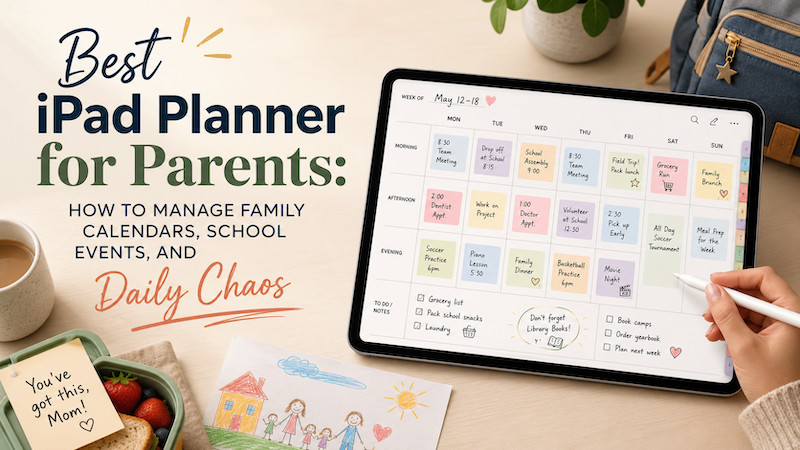
Instead of keeping your calendar in one app and your handwritten notes somewhere else, Planner for iPad lets you see your calendar events directly on your planner pages. Then you can write around them with Apple Pencil.
For parents, this can make planning feel more natural.
You can look at your weekly schedule and immediately add notes like:
- “Pack lunch early”
- “Ask teacher about form”
- “Easy dinner”
- “Leave 20 minutes earlier”
- “Buy gift after pickup”
These are the kinds of notes that make sense visually, next to the actual day or event.
How Parents Can Use Planner for iPad
Here is a simple weekly routine that works well for family planning.
1. Review the Week on Sunday
Open your weekly planner view and look at the family schedule.
Check for:
- School events
- Work meetings
- Appointments
- After-school activities
- Family plans
- Travel time
- Busy evenings
Then write down anything that needs preparation.
For example:
- What needs to be packed?
- Which days need quick meals?
- Who needs to be picked up?
- Are there forms, payments, or supplies needed?
This turns your planner into a weekly family command center.
2. Mark the Busy Days
Some days look normal until you notice that too many small things are stacked together.
With Apple Pencil, you can circle, underline, or highlight crowded days.
This helps you quickly see which days need extra care.
For example, if Tuesday has school pickup, a work deadline, and a dentist appointment, you may decide not to cook that night. That is not laziness. That is good planning.
3. Add Notes Around Calendar Events
Calendar events are usually short. Handwritten notes let you add context.
A calendar event might say:
Soccer practice — 4:30 PM
Your handwritten notes might say:
- Bring water bottle
- Wash uniform
- Pick up snacks
- Leave before traffic
This is where digital handwriting shines. You are not forced to turn every small thought into a formal task. You can simply write it where it belongs.
4. Use Daily Pages for the Messy Details
Weekly planning helps you see the big picture. Daily planning helps you survive the actual day.
On busy days, you can use a daily page to write:
- Errands
- Meal ideas
- Shopping notes
- Calls to make
- Things to bring
- Small reminders
This is especially useful for parents because many tasks are not large projects. They are tiny, scattered responsibilities.
A planner gives those small things a place to live.
5. Keep Family Planning Flexible
No planner can prevent plans from changing.
Children get sick. Events move. Work runs late. Someone forgets something. The weather ruins the original plan.
That is why a good parent planner should be flexible.
With an iPad planner, you can adjust your notes, rewrite plans, and keep your week updated without wasting paper or starting over.
Why Apple Pencil Matters
Typing is useful, but handwriting feels different.
For many parents, handwriting is faster and more natural for planning. You can quickly draw arrows, circle important events, write in the margin, or add a note without opening menus.
Apple Pencil makes the iPad feel less like a strict productivity system and more like a real planner.
That matters because family planning is not always neat. Sometimes you just need to write:
“Do not forget this.”
And circle it three times.
Who Planner for iPad Is Best For
Planner for iPad is especially useful for parents who:
- Already use Apple Calendar, Google Calendar, or Outlook
- Want to see calendar events inside a planner
- Like handwriting with Apple Pencil
- Prefer visual weekly planning
- Need a place for both schedules and small notes
- Want something more flexible than a normal calendar app
It is also a good fit if you like paper planners but want the convenience of digital calendar sync.
A Family Planner Does Not Need to Be Complicated
The best family planning system is not the most complex one.
It is the one you actually keep using.
For parents, that usually means the planner needs to be quick, visual, flexible, and forgiving. You should be able to open it, understand the week, write what matters, and move on.
Planner for iPad helps by bringing your calendar events and handwritten planning together in one place.
You can keep your schedule connected, add the human details around it, and make the week feel a little less chaotic.
Final Thoughts
Parents do not need another productivity app that demands more work.
They need a planning space that understands real life: school events, family appointments, errands, meals, reminders, and all the small things that happen between official calendar events.
If your family already uses Apple Calendar, Google Calendar, or Outlook, Planner for iPad can help you turn that schedule into a handwritten planner.
It gives you the structure of a calendar and the flexibility of paper.
For family life, that combination can make all the difference.