A daily planner helps you manage today.
A weekly planner helps you organize the next few days.
A monthly planner helps you understand the shape of the month.
But sometimes even a month is too small.
When you are planning vacations, major projects, school terms, launches, busy seasons, financial goals, or simply the life you want to have over the next twelve months, you need to zoom out much further.
That is where a yearly planner becomes useful.
A good yearly planner for iPad gives you something that ordinary calendar apps often struggle to provide:
a sense of the entire year as one continuous piece of time.
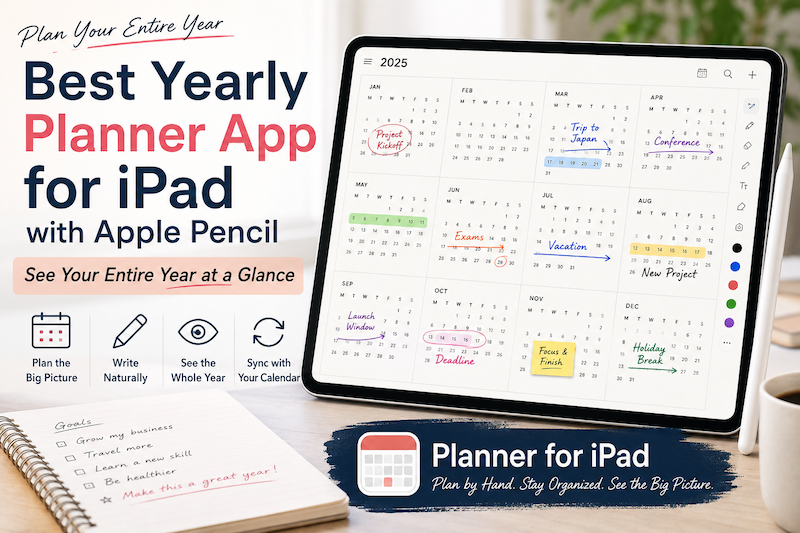
And with Apple Pencil, you can do more than simply look at dates. You can circle important periods, draw arrows between milestones, mark busy months, write goals in the margins, and gradually turn the year into a plan that makes sense to you.
Why Use a Yearly Planner?
Most digital calendars are designed around events.
You add:
- Meetings
- Appointments
- Birthdays
- Flights
- Deadlines
- Classes
- Reservations
This works extremely well when you need to know what is happening on a particular day.
But a year contains patterns that are difficult to notice one day at a time.
For example:
You may have three major project deadlines between September and November.
You may be planning two vacations but accidentally placing both close to the busiest periods at work.
A student may have exams, internships, holidays, and application deadlines spread across several months.
A teacher may need to understand an entire academic year rather than simply the next week.
A freelancer may have busy client periods followed by almost empty months.
When you see all twelve months together, these patterns become much easier to recognize.
A yearly planner is less about asking:
“What do I need to do today?”
and more about asking:
“What is this year becoming?”
A Year View Changes the Questions You Ask
Different planner views are useful because they encourage different kinds of thinking.
Daily view
What should I do next?
Weekly view
How should I organize the next several days?
Monthly view
What is coming up, and where are the busy periods?
Yearly view
Where is the whole year going?
That last question is surprisingly important.
Without a yearly view, it is easy to make decisions locally.
You agree to another project because October looks relatively open.
You schedule a trip because the individual week seems available.
You decide to start a major personal project “sometime this summer.”
But when you zoom out, the picture may look very different.
October may already sit between two exhausting months.
Your trip may fall directly after a major work deadline.
And “sometime this summer” may disappear once you notice how few genuinely free weeks you have.
The year view provides context.
It helps you see not only individual commitments, but the relationship between them.
Yearly Planning Is Not About Filling Every Month
There is a temptation when using a yearly planner to turn the entire year into one enormous productivity plan.
January: start a new habit.
February: launch a project.
March: learn a language.
April: run a marathon.
May: reorganize your entire life.
That usually creates a planner that looks impressive in January and slightly ridiculous by March.
A better yearly plan leaves space.
The purpose is not to decide exactly what you will be doing on November 17 at 2:00 PM.
The purpose is to mark the things large enough to shape your year.
For example:
- Major work projects
- Product launches
- Vacations
- School terms
- Exams
- Conferences
- Family events
- Financial deadlines
- Seasonal commitments
- Creative projects
- Long-term goals
- Periods when you deliberately want fewer commitments
This gives the year a rough structure without pretending you can predict everything.
Apple Pencil Makes Yearly Planning More Flexible
A traditional calendar interface is highly structured.
Everything wants to become an event.
It needs a date.
Sometimes a start time.
Sometimes an end time.
Sometimes a notification.
That is useful for an appointment.
It is less useful for a thought such as:
“Maybe take a long trip around here.”
Or:
“Do not start another major project in this period.”
Or:
“Possible launch window.”
These are not really calendar events yet.
They are planning thoughts.
This is where Apple Pencil works particularly well.
Instead of creating formal events for every idea, you can simply write them onto your yearly planner.
Circle two weeks.
Draw an arrow from one month to another.
Put a question mark beside an idea.
Cross something out.
Write “BUSY” across a period.
Add a small note beside a month.
A handwritten yearly plan can remain uncertain while you are still thinking.
That flexibility matters because annual planning is mostly about possibilities before it becomes about commitments.
What to Put on a Yearly Planner
You do not need to copy everything from your daily calendar onto the year view.
In fact, doing so usually makes it harder to read.
The year view works best when it contains information that matters at the scale of months.
Major Deadlines
Think about deadlines that influence the weeks around them, not just the day itself.
A product launch on October 15 may mean September and early October are effectively part of the same commitment.
A thesis deadline in June may shape the entire spring.
Marking these milestones lets you see the pressure they create around them.
Vacations and Travel
Travel affects more than the days you are away.
There may be preparation beforehand and recovery afterward.
Seeing vacations on the yearly view makes it easier to avoid accidentally placing major work immediately around them.
It also makes something else visible:
whether you are actually taking enough time off.
School and Academic Dates
For students, teachers, and parents, the real structure of the year is often the academic calendar rather than January through December.
Mark:
- Terms
- Semesters
- Exams
- School holidays
- Application deadlines
- Graduation
- Parent meetings
- Major assignments
Once these are visible together, planning the rest of the year becomes much easier.
Large Projects
A large project should not appear as a single deadline.
You might sketch its rough phases:
Research → Draft → Review → Launch
Even if the dates are approximate, placing the project across several months gives you a much more realistic picture of the time it will occupy.
Personal Priorities
Not everything important belongs to work.
You might mark:
- A month you want to travel
- A period for home improvements
- A family visit
- A fitness goal
- A reading project
- A creative project
- A quieter period after a busy season
A yearly planner can help prevent personal plans from being squeezed into whatever space remains after work.
Plan Seasons, Not Just Dates
One of the most useful ways to think about yearly planning is in seasons.
Not necessarily spring, summer, autumn, and winter.
Your own year may have different seasons.
Perhaps January through March is your busiest work period.
April is quieter.
May and June are focused on a major project.
July and August are slower because of family schedules.
September feels like a second beginning.
November and December are dominated by holidays.
These patterns are difficult to see from a daily calendar.
But once you look at the whole year, they become obvious.
You can then plan with these rhythms rather than constantly fighting them.
Use the Year View Before the Month View
A useful planning habit is to move from large to small.
Start with the year.
Then plan the month.
Then the week.
Then the day.
For example, suppose you want to complete a large project by the end of October.
On the yearly page, you may decide:
August — research September — production October — finish and launch
Then, when you open August in your monthly planner, you already know what that month is supposed to accomplish.
From there, the weekly planner can turn the monthly goal into realistic work.
Finally, the daily planner helps you decide what to do today.
This creates a simple hierarchy:
Year → Month → Week → Day
The larger view provides direction.
The smaller views turn that direction into action.
Do a Simple Yearly Review Every Month
A yearly plan should not be something you create in January and never look at again.
Projects move.
Trips change.
New opportunities appear.
Deadlines disappear.
Priorities change.
Instead of treating your yearly plan as a fixed contract, treat it as a map that you regularly update.
At the beginning or end of each month, spend a few minutes looking at the year view.
Ask:
- What has changed?
- Is the next month unusually busy?
- Are two major commitments getting too close together?
- Do I need to move something?
- Is there enough empty space?
- Have I postponed something several times?
- Is a long-term goal actually receiving any time?
Leave Empty Space in the Year
Empty space is one of the most valuable things you can see on a yearly planner.
A completely full year may initially look productive.
In practice, it means there is nowhere for anything unexpected to go.
And something unexpected will appear.
A new project.
An opportunity.
A delayed deadline.
A trip.
Or simply a period when you are more tired than expected.
When you can see the entire year, you can deliberately protect open periods instead of accidentally consuming them.
You might even write:
KEEP THIS MONTH LIGHT
across a section of the planner.
That is still planning.
Sometimes the most useful thing a planner can tell you is not what to add, but what not to add.
Using Planner for iPad for Yearly Planning
Planner for iPad is designed around the idea that digital planning should still feel like planning on paper.
You can use Apple Pencil to write directly on your planner rather than forcing every thought into a form, task, or calendar event.
The Year View gives you a place to step away from the detail of daily and weekly planning and look at the larger structure of the year.
You might use it to:
- Circle major deadlines
- Mark holidays
- Write project names across several months
- Identify busy seasons
- Reserve time for travel
- Sketch long-term goals
- Note important personal events
- Leave reminders for your future self
Then, as those plans become more concrete, you can move into the monthly, weekly, and daily views to work out the details.
Planner for iPad also supports Apple Pencil handwriting and can display schedules from calendars connected to your iPad.
The result is a planning system where you can move between two very different ways of thinking:
zoom out to understand your year, then zoom in to decide what to do next.
Yearly, Monthly, Weekly, and Daily Planning Work Best Together
There is no single “best” planner view.
Each one solves a different problem.
A yearly planner gives you direction.
A monthly planner gives you perspective.
A weekly planner helps you allocate your time.
A daily planner helps you act.
The useful part is being able to move between them.
When the day feels overwhelming, zoom out.
When the year feels vague, zoom in.
The different views are not competing ways to plan.
They are different levels of the same plan.
Try Planning the Rest of Your Year
You do not have to wait until January 1 to use a yearly planner.
In fact, opening a year view in the middle of the year can be surprisingly useful.
Look at what has already happened.
Then look at what remains.
Choose a few important milestones.
Mark the periods you want to protect.
Write down one or two things you would genuinely like to have completed by the end of the year.
Then leave some space.
A yearly planner is not there to predict the next twelve months perfectly.
It is there to make the shape of those twelve months visible.
And sometimes, simply seeing the whole year at once is enough to make much better decisions about what should happen next.
Try Planner for iPad
If you like the flexibility of planning by hand with Apple Pencil but still rely on a digital calendar, Planner for iPad brings the two together.
Use the Year View to understand the big picture, then move into monthly, weekly, and daily pages as your plans become more detailed.
Your calendar tells you where you need to be.
Your daily planner tells you what to do next.
Your yearly planner helps you decide where you want the year to go.