Digital planning has become complicated.
There are calendar apps, task managers, note-taking apps, project management tools, habit trackers, dashboards, widgets, reminders, automations, and endless productivity systems that promise to organize your life.
But sometimes, the best planning tool is still the simplest one:
A page.
A pen.
A few honest notes about what matters today.
That is why Apple Pencil planning feels so different from typing into another productivity app.
With the right iPad planner, Apple Pencil can turn your iPad into something closer to a paper planner — but with the convenience of a digital calendar, flexible pages, and a layout that is always ready when you open it.
Why Apple Pencil Works So Well for Planning
Typing is fast. That is useful for writing emails, capturing meeting notes, or making long documents.
But planning is not always about speed.
Planning is about thinking.
When you write with Apple Pencil, you slow down just enough to make choices. You do not type every possible task. You decide what actually deserves space on the page.
That small difference matters.
A typed task list can easily become a dumping ground. You add everything, then spend the rest of the day feeling behind.
A handwritten plan feels more deliberate. You write the three things that matter. You circle something important. You draw an arrow. You cross something out. You leave space when your day feels uncertain.
That kind of planning is hard to recreate with a keyboard.
The Problem with Many Digital Planners
Many iPad planners are beautiful.
They look like paper planners. They have covers, tabs, stickers, monthly pages, weekly spreads, and carefully designed layouts.
But many of them are really PDF templates.
That can work well if you enjoy building your own system. You can import the PDF into a note-taking app, write on top of it with Apple Pencil, and customize everything manually.
The problem is that a PDF planner is still a PDF.
It does not automatically understand your schedule. It does not behave like a real calendar. It often requires setup, maintenance, imports, hyperlinks, and template management.
For some people, that is part of the fun.
For others, it becomes one more thing to manage.
If you want to plan with Apple Pencil but do not want to maintain a complicated planner system, a dedicated iPad planner app may be a better fit.
What an Apple Pencil Planner Should Actually Do
A good Apple Pencil planner should not simply give you a blank page.
It should give you structure without taking away freedom.
At minimum, it should let you:
- Write naturally with Apple Pencil
- Plan your day, week, and month visually
- See your calendar schedule while planning
- Add handwritten notes without fighting the interface
- Open the app and start planning immediately
- Avoid rebuilding your planner every month or year
The best iPad planner is not necessarily the one with the most features.
It is the one you can actually keep using.
Planner for iPad: A Planner Built Around Apple Pencil
Planner for iPad is designed for people who like the feeling of handwriting, but want something more useful than a static paper planner or PDF template.
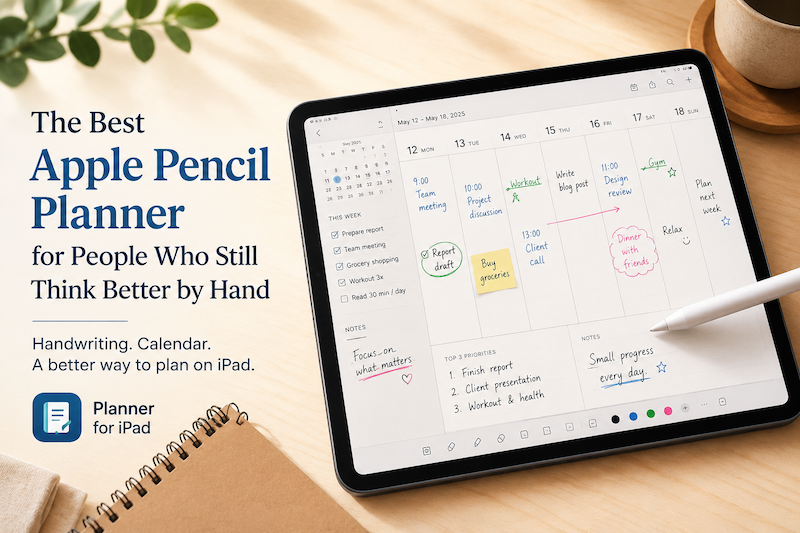
You can write directly on your planner pages with Apple Pencil, organize your schedule visually, and use daily, weekly, and monthly views as part of one simple planning system.
The important difference is that Planner for iPad is not just a notebook.
It is a planner.
That means the app is built around time, days, weeks, months, and real planning habits — not just blank pages where you have to create everything yourself.
Why Calendar-Based Planning Matters
One of the biggest problems with handwritten planning is that it can become disconnected from your real schedule.
You write a beautiful plan for the day, but your calendar already has three meetings, a school event, a dentist appointment, and a deadline you forgot about.
That is where digital planning should help.
With Planner for iPad, you can plan by hand while keeping your calendar schedule visible. This makes Apple Pencil planning much more practical for everyday life.
Instead of switching between a calendar app and a note-taking app, you can write your plan around the events that are already part of your day.
That makes your planner feel less like a separate notebook and more like a real planning space.
Apple Pencil Is Especially Good for Weekly Planning
Weekly planning is where Apple Pencil really shines.
A week is not just a list of tasks. It is a shape.
Some days are heavy. Some days are open. Some tasks belong together. Some things need to move when your schedule changes.
When you plan with Apple Pencil, you can see the whole week and think visually.
You can draw arrows between days.
You can circle the busiest morning.
You can write a reminder in the margin.
You can cross out a task without deleting the history of your decision.
This is one of the reasons many people still love paper planners.
Planner for iPad brings that same feeling to the iPad, while making it easier to carry, edit, and use every day.
Better Than a Task App for Some Kinds of Thinking
Task apps are useful when you need databases, due dates, filters, labels, notifications, and recurring lists.
But not every plan needs to become a system.
Sometimes you just need to sit down and ask:
What do I need to do today?
What is realistic this week?
What am I forgetting?
What should I not do?
Apple Pencil is good for that kind of thinking because it feels open-ended.
You are not filling out fields.
You are not managing a database.
You are not turning every thought into an item.
You are thinking on a page.
For many people, that is the missing piece in digital productivity.
Who Should Use an Apple Pencil Planner?
An Apple Pencil planner is a good fit if you:
- Like paper planners but want the convenience of iPad
- Prefer handwriting over typing
- Want to plan visually
- Feel overwhelmed by complex productivity apps
- Want a calmer way to organize your day
- Use your calendar but still need space to think
- Want a planner that feels personal, not mechanical
It is especially useful for students, professionals, parents, freelancers, creatives, and anyone whose schedule changes often.
If your current system is too rigid, Apple Pencil planning gives you room to adapt.
The Goal Is Not Perfect Productivity
A good planner should not make you feel like you are failing.
It should help you return to your day.
That is the real value of planning with Apple Pencil on iPad. It gives you a quiet place to think, adjust, and decide what matters next.
You do not need a perfect system.
You need a planner you will actually open.
Try Planner for iPad
If you want an iPad planner that is built for Apple Pencil, handwriting, and real calendar-based planning, try Planner for iPad.
It gives you the natural feeling of writing by hand, with the convenience of a digital planner designed specifically for iPad.
Instead of choosing between a paper planner and a complicated productivity app, you can use something in between:
A calm, flexible planner that lets you write, think, and plan your day with Apple Pencil.
Download Planner for iPad on the App Store and start planning by hand on your iPad today.