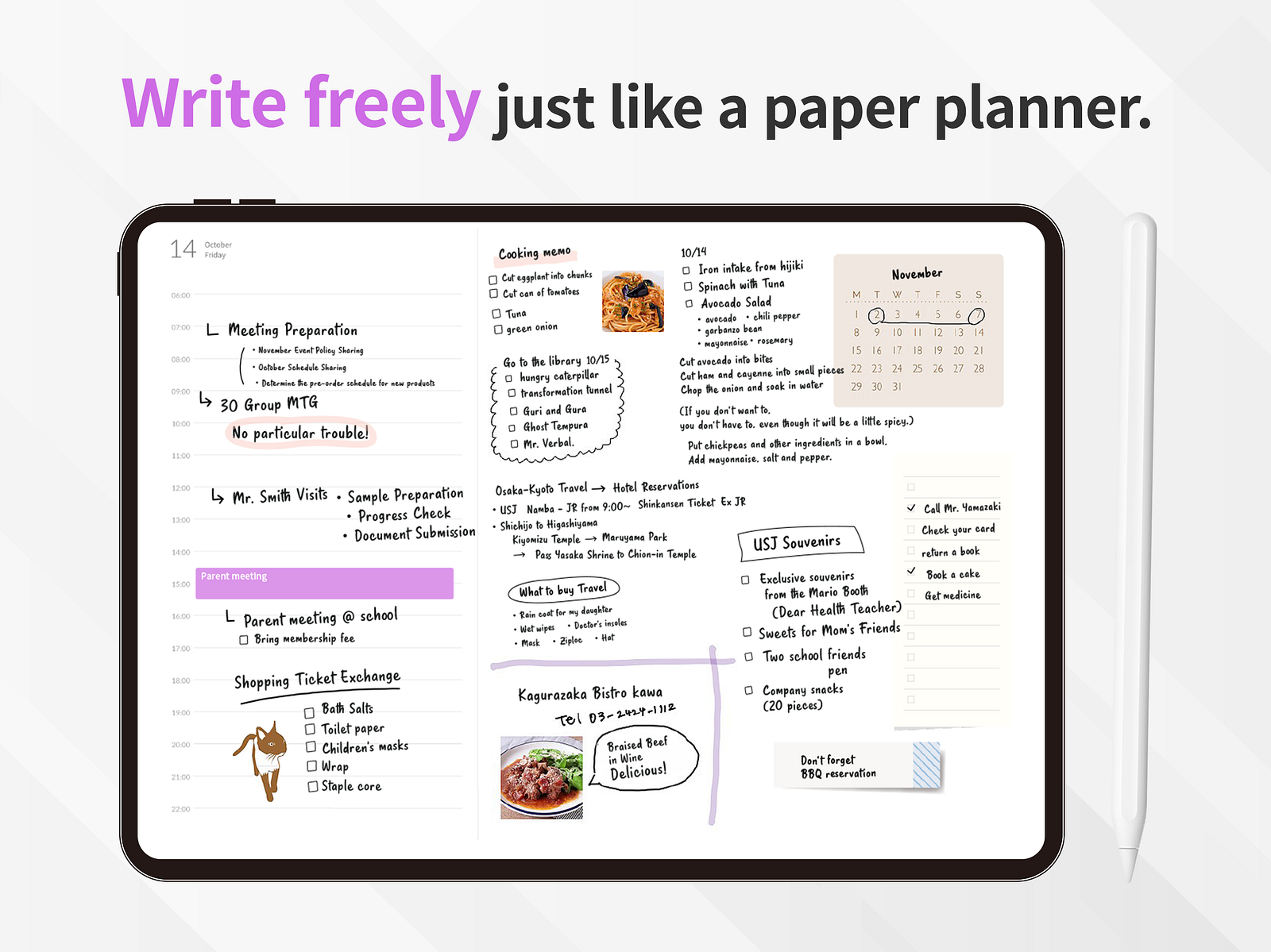
If you’re reading this, chances are you already know the joy of planning by hand on an iPad. There’s something about putting Apple Pencil to screen — sketching out your week, scribbling goals in the margin, crossing things off with a satisfying stroke — that no keyboard-driven app can replicate.
And you’ve probably tried the popular approach: download GoodNotes or Notability, buy a PDF planner template from Etsy, and start filling in the pages. It works. Sort of.
But here’s the thing no one talks about. You open your beautifully designed PDF planner to plan your Tuesday, and then you switch to Apple Calendar to check what meetings you have. Then you switch back to write them in. Then a new invite comes in, and your handwritten plan is already out of date. You’re not planning — you’re transcribing. Twice.
What if your planner already knew what was on your calendar?
What Is Planner for iPad?
Planner for iPad is a digital planner built from scratch for iPad and Apple Pencil. Not a note-taking app with planner templates bolted on. Not a PDF you import into another app. A purpose-built planner.
When you open it, you get a clean weekly spread — ready to write on immediately. No hunting for templates, no downloading files, no configuring page sizes. Just open and write.
The design philosophy is simple: the best planner is the one you actually use. That means removing every friction point between you and the act of planning. No setup. No templates. No fiddling.
But simplicity doesn’t mean limited. Under the hood, Planner for iPad does something that no PDF template ever could.
The Feature That Changes Everything: Live Calendar Integration
Here’s where Planner for iPad breaks away from the pack.
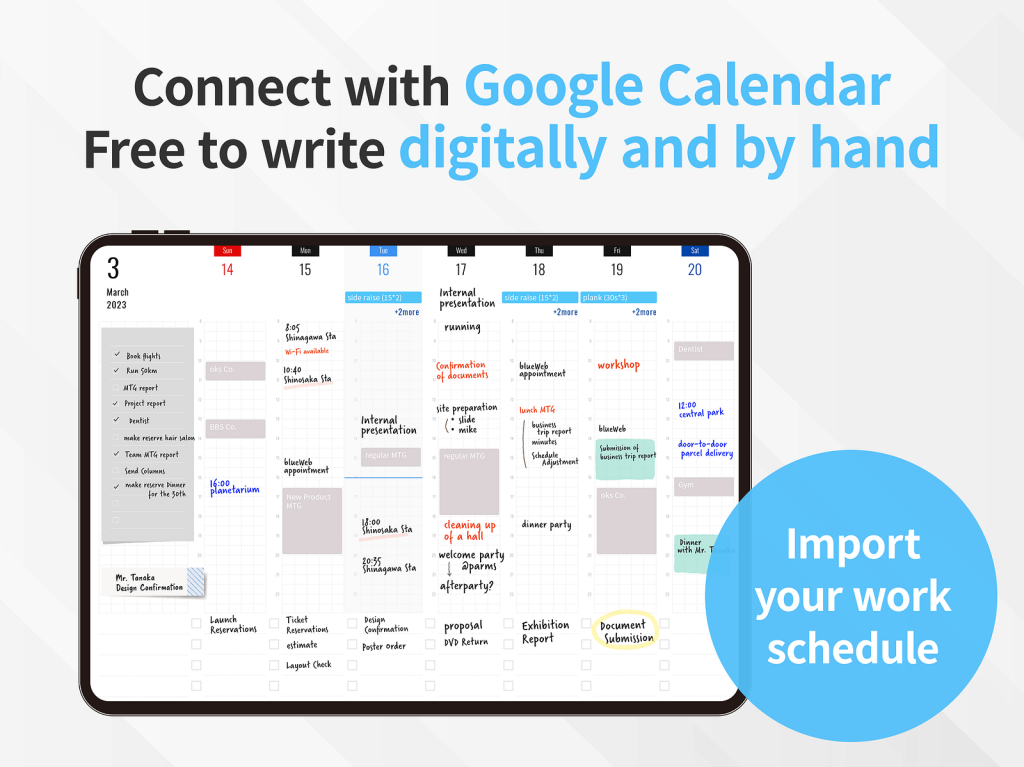
Your events from Apple Calendar and Google Calendar appear directly inside your planner pages. Open your weekly spread on Monday morning, and your meetings, appointments, and deadlines are already there — rendered right alongside your handwritten notes.
This isn’t a static import. It’s a live connection. When a colleague reschedules your 2pm meeting to 3pm, your planner updates. When you add a dentist appointment from your iPhone, it shows up in your planner the next time you open it. Your Apple Reminders are there too, so your to-do list and your schedule live in the same view.
Think about what this means for your daily workflow:
Morning planning becomes effortless. You open your planner, see your calendar events already laid out, and simply start writing around them — adding priorities, jotting notes for each meeting, blocking time for deep work. No app-switching. No copying.
Your plans stay current. With a PDF template, the moment you write something down, it’s frozen in time. With Planner for iPad, your digital calendar keeps your planner honest. The handwritten layer is yours; the calendar layer stays in sync.
Handwriting meets connectivity. You get the cognitive benefits of writing by hand — better memory, deeper processing, more creative thinking — without sacrificing the convenience of a connected calendar. It’s the best of both worlds.
If you use Google Calendar for work and Apple Calendar for personal life, both feeds appear together in your planner. You see your full picture in one place, annotated in your own handwriting.
Why This Matters (And Why PDF Templates Can’t Do It)
The most popular iPad planning setup right now is some combination of GoodNotes + a PDF template. It’s a solid workflow, and the template designers in that community do incredible work.
But a PDF is a static file. It can’t pull in your calendar events. It can’t sync with Reminders. It can’t update when your schedule changes. Every time your plans shift, you’re back to erasing and rewriting — or worse, your planner no longer reflects reality.
Planner for iPad isn’t competing with those templates on aesthetics or customization. It’s solving a fundamentally different problem: bridging the gap between the analog feel of handwriting and the connected reality of your digital life.
This is what we mean when we say: Plan on paper. Connect like an app.
Who Is Planner for iPad For?
You might love Planner for iPad if you already plan on your iPad but are tired of the double-entry between your PDF planner and your calendar app. Or if you value the ritual of handwriting but don’t want to give up the convenience of digital calendars. If you use Apple Pencil daily and want an app designed around it — not adapted for it as an afterthought. If you juggle multiple calendars (Google Calendar for work, Apple Calendar for personal) and want them unified in your planning view. Or if you simply prefer simplicity over customization — you’d rather open and start writing than spend time setting up templates and layouts.
Whether you’re a student managing classes and deadlines, a professional juggling meetings across time zones, or someone who journals and plans as a wellness practice — if you believe planning should feel like writing in a notebook but work like a modern app, this is built for you.
Try It
Planner for iPad is available on the App Store. Open it, and you’re planning within seconds — with your calendar already there.
If you want to see it in action, follow us on Instagram where we share tips, workflows, and real planning spreads from our community.
Your planner should work as hard as you do. And it should start by knowing what’s already on your schedule.