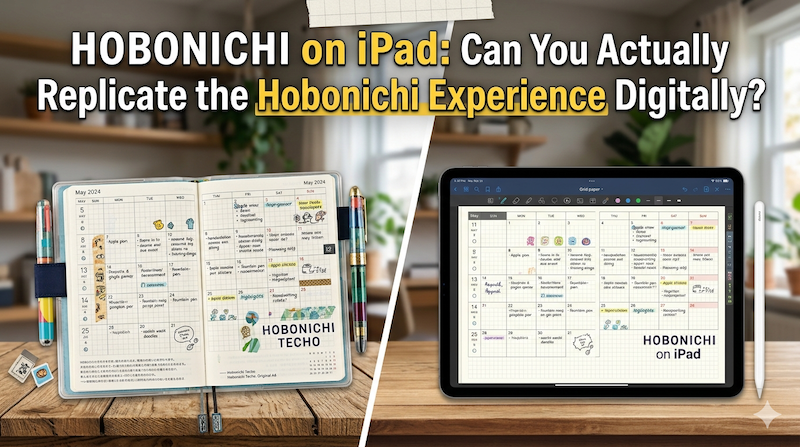
Tomoe River paper. A page a day. The smell of new ink in October. The Hobonichi Techo isn’t just a planner — it’s a ritual. So can an iPad really do what it does? I’m a Japanese developer who makes a planning app, and I’ll tell you the honest answer.
Every September, something quietly happens in Japan.
Stationery sections of department stores rearrange themselves. Loft, Tokyu Hands, Maruzen — they all clear out a wall, and overnight it fills with little A6 books in soft covers. Some people pre-order. Some come back three times before they buy. The Hobonichi Techo for the new year has arrived, and for a not-small subset of the population, this is one of the most important purchases of the year.
If you’ve never seen this firsthand, it’s hard to describe. It’s not just shopping. People stand at the display for twenty minutes choosing a cover. They flip through the bonus pages — this year there’s one about mochi, and one about the shinkansen — like they’re choosing a novel. The Hobonichi Techo is a planner, yes. But in Japan it’s also a small annual ceremony.
I’m Takeya. I’m Japanese. I make Planner for iPad, a handwriting planner app. I get this question constantly, mostly from English-speaking users:
“Can I replicate the Hobonichi experience on my iPad?”
The question is asked in good faith. They love the idea of Hobonichi but don’t want another paper book on the desk. Or they live in a country where shipping is painful. Or they already have an iPad and an Apple Pencil and don’t want to maintain two systems.
So here’s the honest answer, from someone who grew up with techo culture and now builds a digital planner for a living:
Some of it, yes. A surprising amount, actually. But not all of it. And the parts you can’t replicate are exactly the parts Hobonichi fans love most.
Let me explain what I mean.
What is Hobonichi, actually?
Before we ask whether iPad can replicate it, we have to be precise about what it is.
Hobonichi Techo (ほぼ日手帳) was launched in 2002 by Hobo Nikkan Itoi Shinbun — a small media company founded by Shigesato Itoi, the copywriter who wrote the famous Studio Ghibli taglines and created the MOTHER video game series. The product is, on paper, simple:
- An A6 (or A5, or weekly, or other size) softcover book
- One page per day
- Tomoe River paper
- Lay-flat binding
- A removable cover system you can mix and match
- Bonus pages with charming, slightly random content
- Sold for one calendar year, then a new edition
The most popular format, the Original (A6), gives you 366 daily pages, plus monthly spreads at the front. The Cousin (A5) is bigger, with weekly time-block spreads added. The Weeks is wallet-shaped — left page for the week, right page blank. The Day-Free is monthly only, for people who plan loosely. The 5-Year Techo stacks the same date across five years on one spread.
That’s the product. But the product isn’t why people love it.
People love Hobonichi for reasons that aren’t really about planning at all.
Why Hobonichi is more than a planner
If you ask a long-time Hobonichi user what they actually do with it, you’ll rarely hear “manage my schedule.” You’ll hear things like:
- “I write what I ate.”
- “I tape in train tickets and museum stubs.”
- “I sketch.”
- “I write one sentence about how I felt that day.”
- “I track when my baby first laughed.”
- “I just wanted somewhere to be honest.”
The Hobonichi page-a-day format is intentionally generous. There’s a thin grid, a daily quote, a small calendar in the corner — and that’s it. The rest is empty. You can use it as a calendar, a diary, a sketchbook, a food log, a meeting notebook, or all of these on the same page. Itoi himself has called the techo a “Life Book” — not a productivity tool, but a place where your life accumulates.
This is the crucial thing to understand: Hobonichi is loved because it doesn’t tell you what to do.
It hands you 366 blank pages with just enough structure to feel anchored, and absolutely no opinion about whether you should be more productive. There are no streaks. No reminders. No nudges. No AI assistant suggesting that you “schedule deep work between 9 and 11 AM.” It’s a paper book, and it cannot care less whether you write in it tomorrow.
That neutrality, that stillness, is the entire point.
Now — let’s ask whether iPad can replicate that.
What an iPad can replicate
Quite a lot, actually. More than people expect.
The handwriting
This is the obvious one. Apple Pencil + iPad has, for several years now, been genuinely close to writing on paper. The Apple Pencil Pro has barely-perceptible latency, real pressure sensitivity, and a tilt detection that lets you shade like you would with a pencil. On a good iPad screen with a paper-feel screen protector, the experience is — to be careful here — almost indistinguishable from writing in a real notebook. Almost.
If you’re writing a daily log, jotting a meeting note, or sketching a small drawing in the margin, the iPad will do this without complaint. You can change ink colors instantly. You can erase without smudging. You can switch between a fountain pen line and a marker line on the same page. None of this is possible on Tomoe River paper.
The page-a-day format
Any decent iPad planner app — including Planner for iPad — gives you a daily view with empty space to write. Some people use GoodNotes with a Hobonichi-style PDF template. Others use a dedicated planning app with a daily layout built in. Either way, the visual structure of “one day, one page, mostly blank” is trivially easy to reproduce digitally.
In fact, the iPad has an advantage here: you don’t run out of space. If your day overflows, you can keep writing. If your day is empty, you haven’t wasted physical paper.
The mix of typed and handwritten content
Hobonichi users tape things in. Stamps. Stickers. Movie tickets. Photos. On iPad, you can drop in photos, screenshots, web clippings, calendar events, and stickers — all in the same daily page. This is one place where digital is genuinely better. Your photos from this morning’s walk are already on your device. You don’t have to print them.
The continuity across years
Hobonichi requires you to buy a new book every year, and figure out where to store the old ones. (Many long-time users have shelves of them.) On iPad, all your pages live in the app, searchable, scrollable, scannable. If you wrote about a restaurant three years ago and want to find that note, you can — assuming you wrote enough text to search for. With paper, you’d be flipping pages.
The cover/customization layer
Hobonichi’s cover system is iconic — you choose a fabric, leather, or designer cover, and swap it year to year. iPad apps offer their own version of this: themes, paper styles, cover images, custom stickers, Apple Pencil colors. It’s not the same as holding an Ona Hama leather cover in your hands, but it’s not nothing.
So: handwriting, page-a-day, mixed content, multi-year continuity, customization. All of these the iPad does well. In some cases, better than paper.
But.
What an iPad can’t replicate (and probably never will)
The paper
Tomoe River paper is one of the great achievements of modern Japanese stationery. It’s astonishingly thin — about 52 gsm — yet doesn’t bleed through with most fountain pen inks. It has a particular smoothness that makes a fude-like nib glide. The current Hobonichi books use Tomoe River S, a slightly updated version, but the character is the same: thin, soft, loyal to ink.
There is no iPad screen, however good, that reproduces the feel of writing on Tomoe River paper. There are paper-feel screen protectors that get closer than you’d think. But “close” is not “the same.” When a long-time fountain pen user picks up a Hobonichi, they’re not just writing. They’re feeling a specific friction, a specific give, a specific way the ink sits on the surface and dries slightly slower than on cheaper paper.
If this is the part of Hobonichi that matters to you — and for many people, it is the part that matters most — no iPad will replace it.
The smell
I want to be careful here, because this sounds romantic, but it’s real.
A new Hobonichi has a smell. It’s the smell of fresh paper, mild ink, and the faint binding glue. The first time you open one in October, that smell is part of the ritual. It anchors the year about to begin to a specific sensory moment.
The iPad does not smell like anything. It smells like aluminum and slightly warm electronics. Whatever else can be replicated digitally, scent cannot.
The limit
This is the deepest one, and it’s the hardest to explain.
A Hobonichi has 366 pages. That’s it. When the year ends, the book ends. There is no “scroll down to last August.” If you forgot to write for two weeks, those two weeks are blank, permanently. If you wrote something embarrassing, you can’t delete it. If you taped in a movie ticket, it’s there forever, slightly bulging the page.
This finitude is part of why Hobonichi feels heavier — emotionally — than a digital app. You’re using a physical object that will, by design, become a closed artifact at the end of the year. Some people keep all their old Hobonichis in a box. Some have ten years stacked. Each is a sealed record of a specific year of their life.
iPad apps don’t have this. Your daily pages can be deleted, edited, exported, restored from iCloud, copied to a new device. They are infinitely malleable. This is useful — but it’s also lighter. There’s no closed book at the end. There’s no “this is what 2024 looked like” you can pull off a shelf and hold.
For some users, this doesn’t matter. For others, it’s the entire point.
The bonus pages
This is small but real. Every year, Hobonichi includes a few pages of charmingly random content. Past editions have included:
- A guide to Japanese postal stamp dimensions
- An illustrated explanation of moon phases
- A two-page essay on the history of mochi
- A quick-reference for shinkansen routes
These are not utilitarian. You don’t need them. They’re little gifts from Hobonichi to the user — a wink, a small surprise. They exist because the team that makes the techo cares about the experience of opening it. No iPad app I know of does anything equivalent. If they did, it would feel forced, because the appeal of Hobonichi’s bonus pages is precisely that they’re slightly weird and clearly hand-curated.
So who should use what?
After all that, you might expect a clean recommendation. I’m going to resist giving you one, because the right answer genuinely depends on what you actually want from a planner.
Use a real Hobonichi if:
- The paper, the binding, the smell, the cover — the object — is part of why you plan at all
- You’re a fountain pen person, or you want to become one
- You want a closed annual artifact you can put on a shelf at year’s end
- You like the constraint of a physical limit (one year, this many pages)
- You’re already in Japan or okay with international shipping
Use an iPad and a planner app if:
- You already write digitally most of the day
- You want to mix handwriting with typed text, photos, and web clippings on the same page
- You want to search across years
- You want calendar sync, so your existing schedule shows up in your daily view
- You travel light and don’t want one more physical thing to carry
- You’re more interested in the practice of daily handwriting than the object you’re writing in
Or — and this is what a lot of long-time Hobonichi fans actually do — use both.
This is the part most articles miss. It’s not a binary choice. Many people who keep a paper Hobonichi for personal/creative use also keep a digital planner for work. The Hobonichi is for the slow, intimate, life-recording side of planning. The iPad is for the fast, schedule-coordinating, shareable side. They serve different parts of the same mind.
What I tried to build, and what I didn’t
When I started building Planner for iPad almost a decade ago, I was deeply influenced by Japanese techo culture. The page-a-day format, the priority of handwriting, the mix of structure and openness — these all came from that tradition. The app was designed for someone who wanted to plan with a Pencil, not type into a database.
But I was also clear-eyed about what I couldn’t do. I cannot give you Tomoe River paper. I cannot give you the smell of October. I cannot give you the satisfaction of holding a closed annual book in December. What I can give you is the practice of sitting down with your iPad in the morning, opening today’s page, writing what you want to do, and ending the day by writing what actually happened. That practice — the daily habit of slowing down with a Pencil — that, I believe, is reproducible on iPad. And it’s most of what makes Hobonichi a good thing in someone’s life.
If you’re reading this and weighing the two: don’t think of an iPad planner as a replacement for Hobonichi. Think of it as a different way to honor the same instinct. The instinct to have a place that’s just yours, that holds the day, that doesn’t try to optimize you, that you write in by hand because hand-writing makes you slower and more honest.
That instinct, I’d argue, is the real legacy of Hobonichi. And it doesn’t actually live in the paper. It lives in the user.
Planner for iPad is a handwriting-first planner app for iPadOS. Apple Calendar and Google Calendar events display read-only inside daily and weekly views. Apple Pencil, stamps, stickers, and customizable templates included.